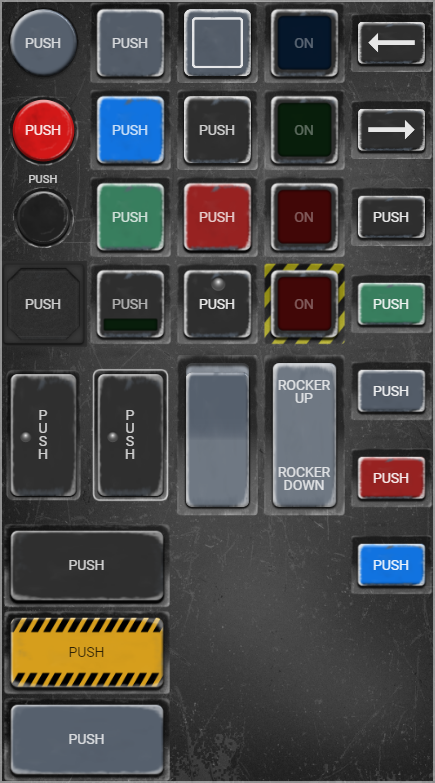
MATRIC has always been a popular choice for building interfaces for DCS World flight simulator. The complex nature of realistic flight simulator often demands custom hardware for maximum immersion. MATRIC provides a convenient and cost effective way to extend the virtual cockpit from PC to tablets and phones (no need to dedicated flightsim hardware your existing phone or tablet can be used).
While usiing MATRIC as a simple "button box" is trivial and good enough for many - MATRIC can be integrated with applications in a much tigher manner. DCS World in particular allows very robust 2-way integration with hardware and software, however in case of MATRIC there was no "out of the box" solution to make the process easier - integration did require a fair bit of time investment (see previous blog posts).
Enter the DCS-BIOS MATRIC Middleware!
DCS-BIOS MATRIC Middleware is a standalone application which uses DCS-BIOS, a de-facto standard interface for DCS World and feeds MATRIC the data (variables) to keep MATRIC in sync with the simulator. Long story short - the middleware removes the need to fiddle with DCS Export lua thus making it much easier to build immersive panels for your virtual cockpit.
Where to get DCS-BIOS MATRIC Middleware?
DCS-BIOS MATRIC Middleware is free and open source app, available on github:
Middleware is fully functional (although I call it beta because you never know what weird & wonderful stuff happens on other people's computers) and I hope to produce a detailed step by step tutorial video on how to use this convenient addition to MATRIC in near future, in the meantime join our Discord for news, updates and support
Matric Server beta 2.8.40 brings some significant improvements that deserve more detailed description.
The most significant new feature is experimental USB (wired) connection support. It enables you to use MATRIC in environments where WiFi connectivity is not available, for example in corporate environment where your PC probably won't be connected to the same network as your tablet/smartphone
Automatic binding of actions to control state is major productivity improvement. In previous versions of MATRIC some actions like OBS related ones and Windows Audio mixer were hard coded to control state - e.g. if you have a button that switch scenes in OBS studio when the scene is active - button lights up (active state). Problem with that approach is that you have absolutely no control over this behavior.
In version 2.8 we introduced the concept of variables which can be bound to controls so for example if you have a variable called obs_scene_active_<Scene name> you can bind it to any button's state to achieve the synchronization between OBS and MATRIC. Issue was that you had to create the binding yourself which in most common case can be seen as unnecessary complication.
In 2.8.40 you will notice a new button on OBS and Windows Mixer actions that will do the work for you in single click while still leaving you the option to develop your own logic with variables. This is a major productivity improvement.
Speaking of productivity, now you can easily switch default/active background and foreground colors and images with one click on the swap button
Significant effort went into improvement of the Desktop Mirror feature. It should be able to hit higher framerate with less CPU impact on PC especially when using multiple mirrors
Some bugs were corrected:
BUGFIX: fixed issue - run app action not working
BUGFIX: fixed issue - crash when exiting app from tray menu
Stay tuned for more updates, and as always - if you want to support MATRIC rate and review the app!
With iOS client (finally) released, focus shifts a bit towards MATRIC server. I've been doing major internal refactoring which greatly simplifies further development. Although this won't be visible to users it was a major undertaking to pave the road for future development.
Regarding client facing features there are two major ones:
Focus on OBS Studio integration
- OBS Websocket 5.x compatibility which means you won't have to download compatibility plugins as OBS websocket comes out of the box with OBS Studio.
- Simplified UI for configuring OBS actions, some things were really not needed or used while others were missing (like manipulating Virtual Camera)
- More robust and reliable
In principle it is working but needs a lot of testing (there are a lot of commands supported)
MATRIC Server Variables
Variables are a new power feature. In a nutshell, MATRIC modules like Windows Audio Mixer and OBS plugin create and update a bunch of variables that is symbols which hold some value. For example variable that holds your current Windows volume or variable with name of the current OBS scene, recording status etc. Users can now bind things like button text, button state, slider value etc to those variables. Before, users had no control over such things (except Integration API).
Some highlights of variables in MATRIC:
You can define your own variables which can be dynamicaly calculated from any other variables. Very easy to do by writing a snippet of Javascript directly in MATRIC!
When binding control text or state to variable - you can also use Javascript to transform the value (example from the picture sets button text to numeric value but also creates a description of volume level)
In not so distant future variables will be supported by Integration API so apps can read and provide variables to MATRIC
All in all exciting things ahead, but always with No.1 priority of keeping it simple (even when adding advanced features)
I believe it is time to reveal plans for the future of MATRIC.
Major focus is to create a unified multi-platform client covering Android, IOS, Windows and MacOS. The effort is well under way and pretty soon betas will be available for public testing. This is where the community help will be extremely valuable by providing feedback.
The sequence of milestones is as follows:
1) New Windows server - it is necessary to support the new client as well as support "legacy" Android client. So old clients will still be able to work with new server, new clients will require server version minimum version of 2.6.
2) New Android client - first we will roll out multi platform client on Android platform as we already have well established store integration and user base. First the beta followed by release when we're confident it is as reliable as the current Android client.
3) IOS client - probably the most frequent question regarding MATRIC was "Can I get it on my iPad?". With new client - it will be supported! The prototype is already running, most of the work left is integration with the Apple store. After integration and internal testing is completed, there will be a TestFlight release. I will post the announcement on Discord looking for volunteers :). Finally when we receive feedback from testers we will release the IOS client. MacOS client might be released concurrently with IOS version.
4) New Windows client - This will replace the current "experimental" Windows client, I was genuinely surprised so many people use it. New client is fully functional - in fact it is my main development/testing platform for the new client, however, platform integration with Microsoft Store will take some effort.
1.64 has been released, these are the new features:
Windows client support
Windows client makes it possible to use Windows devices as MATRIC clients.
While in general it does not make sense to use Windows client on the same PC which is running MATRIC Server (hotkeys and macros wouldn't work as the client would be just sending keystrokes to itself) in some cases it might be useful, for example if using secondary touch screen as OBS Studio deck
Touchpad zone button "action" makes the button a touchpad surface
While MATRIC did support touchpad emulation before, it would show in a different screen. Now you can embed the touchpad surface as you would any button in the deck, just add button and choose "Touchpad zone" as action.
Embed web page "action" enables embedding web pages and HTML fragments in MATRIC deck, however due to various limitations your mileage may vary (some web sites won't allow embedding), e.g. Google maps works, YouTube doesn't.
It does open interesting possibilities like embedding other apps inside MATRIC.
Improved macro editor - now you won't have to record macro all over again if you make a mistake, it is possible to edit keystrokes
Embed Web page - enables you to embed a web page directly into MATRIC decks e.g. Google maps
Touchpad zone - similar to touchpad but instead of opening a special dedicated touchpad screen, touchpad surface is inline with buttons on the deck page
Our most popular deck is "Aviation button templates", we decided to release the source files under Creative Commons license. The zip file contains graphics with layers in 3 formats: original Affinity Designer format, EPS and Photoshop PSD. Attribution is optional.
You will have to uninstall any version lower then 1.62 before installing.
Changes
We switched to WiX installer system. This gives us signifficant new possibilities like automatically configuring firewall during setup, better control over prerequisites installation (Visual C++ runtime and .Net framework). Only downside so far is that you will have to uninstall any version prior to 1.62 before installing 1.62 or higher.
While switching to WiX wasn't easy (to put it mildly), I strongly believe it is a right step towards better user experience and less setup related issues. Please report any issues to our Discord.
User-configurable network ports - to get rid of those pesky Hyper-V conflicts. Do not change Server discovery port until new Android client (with configurable server discovery port is available on Google Play)
Bugfixes
Fix app crash if Run App action target does not exist
Fix app crash if Hotkey action is malformed
Fix properly mark update message as read when clicked
Support for Bluetooth connectivity via Windows Mobile Hotspot
You can now use MATRIC over Bluetooth by utilizing Windows 10 Mobile Hotspot. You need to update MATRIC Android client to latest version to take advantage of this feature.
HTTP request button action
Enables you to send tailor-made HTTP requests from MATRIC at a push of a button. Handy if you want MATRIC to trigger actions on smart devices, social media or any other platform that supports HTTP.
Minor changes and bugfixes
Separate update installation version (will be available on click in MATRIC on Windows) - won't mess up your decks or reinstall defaults or check prerequisites (VC++ and .Net) resulting in more robust and leaner upgrade process
New config file location Documents\MATRIC\config
More popular decks included in default installation
Bugfix: Log file not shown in UI
Bugfix: Button properties panel for VJoy action not opening vjoy download window
Bugfix: Button animation in library panel not shown if button has autorepeat flag set